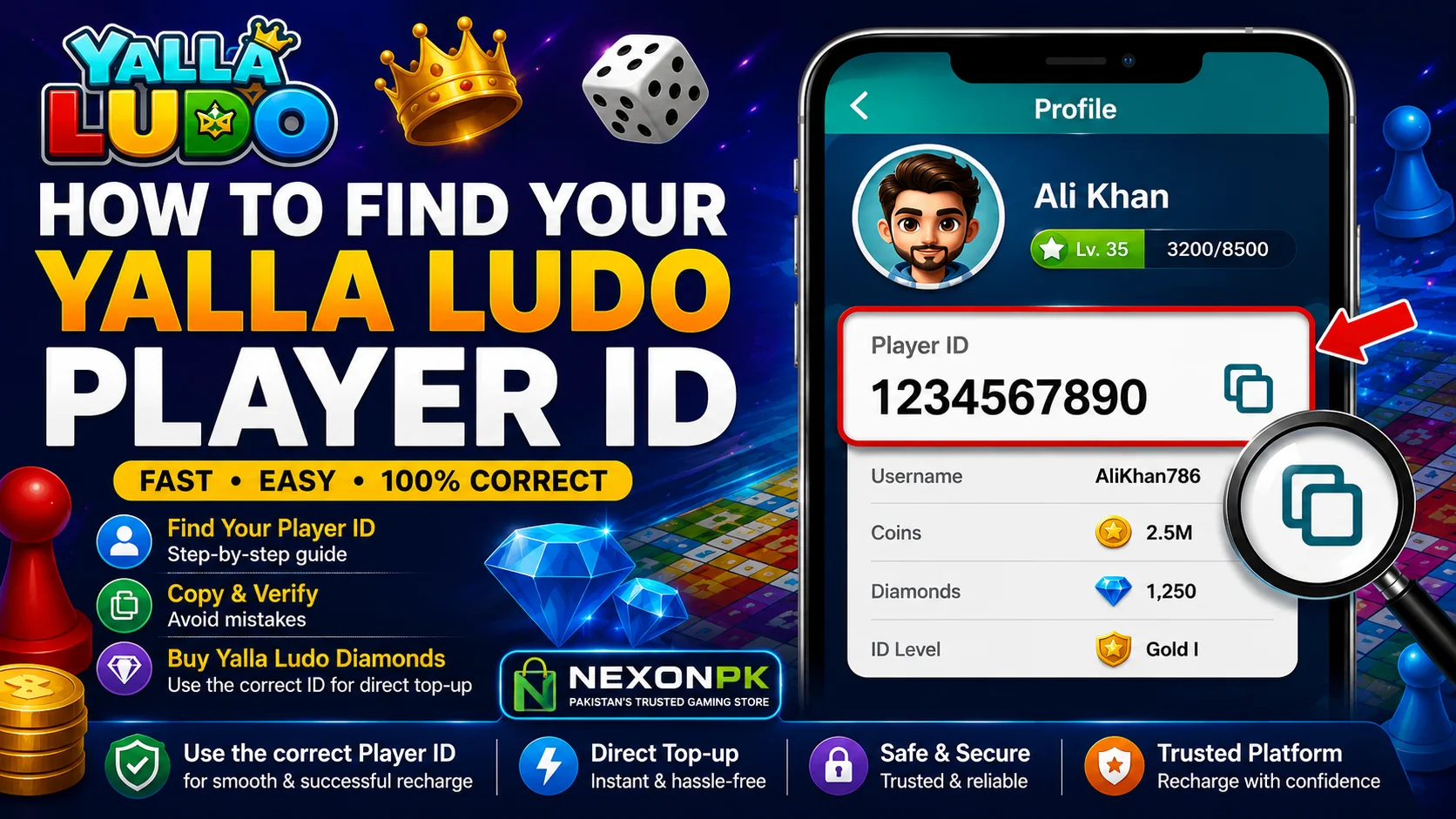
If you want to buy Yalla Ludo Diamonds, recharge your account, or send a top-up to another player, you may need your Yalla Ludo Player ID. This unique account identifier helps a supported recharge service identify the Yalla Ludo account that should receive the top-up.
Many players, especially new users, confuse their Player ID with their username, player name, or profile name. However, these are not necessarily the same thing. Your Player ID is the account identifier shown within your Yalla Ludo profile.
Finding your Yalla Ludo Player ID is simple and usually takes less than a minute. In this guide, you will learn where to find your Player ID, how to copy and verify it, the difference between Player ID and username, and how to use the correct ID when purchasing Yalla Ludo Diamonds.
If you are looking for a direct Player ID-based recharge after finding your ID, you can also check the buy Yalla Ludo Diamonds in Pakistan options available on Nexon.pk.
What Is a Yalla Ludo Player ID?
A Yalla Ludo Player ID is a unique identifier associated with your Yalla Ludo account. Depending on the service or page you are using, it may also be described as a User ID, Yalla ID, or UID.
The ID is different from the name displayed on your profile.
For example, your profile name might be:
Ali Khan
while your account has a separate numerical Player ID.
When a recharge service asks for your Yalla Ludo Player ID, it generally means the unique account identifier rather than your nickname or username.
The exact appearance of the Yalla Ludo interface can change after app updates, so the position of account information may look slightly different on different versions.
Why Do You Need a Yalla Ludo Player ID?
Your Player ID can be important when using a direct account top-up service.
Instead of receiving a voucher or manually redeeming a code, a supported direct recharge service can use the account identifier you provide to process the top-up for the intended Yalla Ludo account.
For this reason, the most important thing is accuracy.
Before submitting a recharge order, make sure:
- Your Player ID is complete.
- Every digit is correct.
- Your Player Name matches the intended account.
- You selected the correct Diamond package.
- The payment amount is correct.
A small mistake in the account ID can create unnecessary processing issues.
How to Find Yalla Ludo Player ID
Finding your Yalla Ludo Player ID is straightforward.
Follow these steps.
Step 1: Open Yalla Ludo
Launch the Yalla Ludo app on your Android or iOS device.
Make sure you are logged into the account whose Diamonds you want to purchase or recharge.
Step 2: Open Your Profile
After opening the game, locate your profile picture or profile icon.
Tap it to open your profile and account information.
Nexon’s current support information also instructs users to open Yalla Ludo and select their profile picture to locate their User ID.
Step 3: Locate Your User ID
Inside your profile, look for the unique numerical identifier associated with your account.
This is the ID that may be referred to as your:
- Yalla Ludo Player ID
- Yalla Ludo User ID
- Yalla ID
- UID
The wording can vary between platforms and recharge services, but the important thing is to use the unique account identifier shown in your profile.
Step 4: Copy Your ID
If your current app interface provides a copy option, use it.
Copying the ID is safer than manually typing a long number because it reduces the possibility of entering an incorrect digit.
If there is no copy option, carefully write down or enter the complete ID.
Step 5: Verify the ID
Before using the ID for a recharge, compare the number you copied with the number shown in your Yalla Ludo profile.
Check it digit by digit.
This simple step can help prevent mistakes when placing a top-up order.
Where Is the Yalla Ludo User ID Located?
The User ID is generally located in your Yalla Ludo profile/account section.
The basic process is:
Open Yalla Ludo → Tap Profile → View Account Information → Locate User ID
If the layout looks different on your device, look around your profile information, username, or account details.
Yalla Ludo can update its interface, so the exact location or design may change over time.
Yalla Ludo Player ID vs Username
One of the most common mistakes is assuming that the Player ID and username are the same.
They are different types of account information.
| Account Information | What It Means |
|---|---|
| Player ID / User ID | Unique identifier associated with the account |
| Username / Player Name | Name displayed for the player |
| Profile Picture | Visual representation of the account |
| Password | Private login credential |
For example, a player may have a username such as LudoKing123, but their account may have a completely different numerical User ID.
Therefore, if a recharge form specifically asks for a Player ID, do not enter your username unless the service specifically requests it.
Why Is the Correct Player ID Important for Diamond Recharge?
A direct recharge depends on identifying the correct account.
Suppose two players have similar names:
- Ali123
- Ali_123
Their usernames may look similar, but their account IDs can be completely different.
Using the correct Player ID helps identify the intended account for the recharge.
Nexon’s current Yalla Ludo Diamond Purchase page specifically asks customers for a Yalla Ludo Player ID and Yalla Ludo Player Name when placing an order.
That means you should carefully check both details before submitting your order.
How to Verify Your Yalla Ludo Player ID Before Ordering
Before completing a Diamond recharge, use this simple verification process.
1. Open Your Yalla Ludo Profile
Go directly to your account profile inside the app.
2. Locate the User ID
Find the unique account identifier displayed there.
3. Copy the ID
Use the copy function if available.
4. Compare the ID
Check the copied number against the number displayed in your account.
5. Check Your Player Name
Make sure the Player Name entered into your order belongs to the same account.
6. Review the Diamond Package
Make sure you selected the correct quantity of Diamonds.
7. Check the Final Amount
Verify the amount before completing payment.
This takes only a few seconds but can significantly reduce avoidable ordering mistakes.
Can You Use a Player ID to Buy Yalla Ludo Diamonds?
Yes, supported direct top-up services can use your Yalla Ludo Player ID to identify the account for a recharge.
The general process is:
- Select a Diamond package.
- Find your Yalla Ludo Player ID.
- Enter your Player ID.
- Enter your Player Name if required.
- Select an available payment method.
- Complete payment.
- Wait for order processing.
- Check your Yalla Ludo account.
Nexon’s current product page uses a Player ID-based direct recharge process and lists local payment methods for Pakistani customers.
If you have already found your Player ID, you can proceed to a Yalla Ludo Diamond recharge and check the currently available packages and ordering requirements.
Do You Need Your Yalla Ludo Password for a Player ID Top-Up?
For a Player ID-based recharge, you should not normally need to provide your Yalla Ludo password to a top-up provider.
Your password is private account information.
Never share your password simply because somebody claims it is necessary for a normal recharge.
You should also avoid sharing:
- Login passwords
- OTP codes
- Security codes
- Account recovery information
- Other unnecessary login credentials
A top-up process should clearly explain what information it requires before you make payment.
Can You Recharge Another Player’s Yalla Ludo Account?
If a supported recharge service allows it, you can purchase a top-up for another player’s account by providing the correct Player ID and other required information.
For example, you may want to purchase Diamonds for:
- A friend
- A family member
- Another Yalla Ludo player
However, never guess the other person’s Player ID.
Ask them to provide their exact ID and verify it before submitting the order.
What Happens If You Enter the Wrong Player ID?
Entering an incorrect Player ID can cause problems with a direct recharge.
Depending on the provider and the status of the order, you may need to contact customer support for verification or correction.
If you notice that you entered the wrong ID, contact the service as soon as possible.
Keep your:
- Order number
- Payment receipt
- Transaction reference
- Correct Player ID
- Incorrect Player ID
- Relevant screenshots
Do not immediately place multiple replacement orders unless customer support instructs you to do so.
How to Avoid a Wrong Yalla Ludo ID
The easiest way to avoid an incorrect ID is to copy it directly from your Yalla Ludo profile.
Avoid:
- Typing the number from memory
- Copying an ID from an old screenshot without checking
- Guessing the ID from a username
- Using another player’s ID accidentally
- Skipping the final verification
Always compare the ID with the live account information immediately before placing your order.
Is Yalla Ludo Player ID the Same on Android and iPhone?
The Player ID is associated with the Yalla Ludo account rather than simply being a number belonging to one physical device.
If you access the same account on a compatible device, the account identifier should correspond to that account.
However, account access and available features can depend on the current Yalla Ludo app version and account configuration.
If you change devices, first confirm that you are using the correct Yalla Ludo account before requesting a recharge.
Can You Find a Yalla Ludo Player ID Without Opening the Profile?
The most reliable method is to open the Yalla Ludo app and check the profile/account section.
Third-party websites or people may claim they can identify your account from a username, but you should not rely on unofficial methods when the correct ID is available directly inside your account.
Always use the account information displayed by Yalla Ludo whenever possible.
What Information Is Safe to Provide for a Top-Up?
A recharge service may require certain account information to process a transaction.
For a Player ID-based Yalla Ludo Diamond top-up, this may include:
- Player ID
- Player Name
- Selected Diamond package
- Payment confirmation
The exact requirements depend on the recharge method and provider.
However, sensitive account credentials should remain private.
Never Share Your Password
Your Yalla Ludo password should remain confidential.
Never Share an OTP
An OTP can be used to verify account access or a transaction. Do not give an OTP to an unknown person simply because they claim it is required for a top-up.
Keep Payment Proof
Save your payment receipt or transaction reference until your order has been completed successfully.
What Are Yalla Ludo Diamonds?
Yalla Ludo Diamonds are virtual items used within the Yalla Ludo service.
Yalla Ludo’s Virtual Items Policy explains that Diamonds can be obtained through supported purchase methods and that their applicable price is displayed at the point of purchase.
The available uses of virtual items can change as the game and its features are updated.
This means players should always check the current in-game information rather than relying on an old guide for a permanent list of Diamond features.
Why Do Players Buy Yalla Ludo Diamonds?
Players may purchase Diamonds for different in-game and social purposes.
Depending on the features currently available in the game, Diamonds may be associated with things such as:
- Sending gifts
- Social interactions
- Premium features
- Events
- Digital items
- Other available in-game options
The exact features can change with updates.
Yalla Ludo’s official Virtual Items Policy states that virtual items such as Diamonds are for use within the service and are subject to the platform’s applicable rules and policies.
How to Use Your Player ID for a Yalla Ludo Diamond Purchase
Once you have successfully found your Player ID, purchasing Diamonds through a supported recharge service is straightforward.
Step 1: Choose Your Diamond Package
Select the Diamond quantity you want.
Step 2: Open Your Yalla Ludo Profile
Copy your current Player ID directly from the app.
Step 3: Enter Your Player ID
Enter the complete ID into the required order field.
Step 4: Enter Your Player Name
If required, enter the Player Name associated with the account.
Step 5: Verify Your Details
Compare the information you entered with your Yalla Ludo profile.
Step 6: Complete Payment
Choose one of the payment methods currently offered by the service.
Step 7: Wait for Processing
After payment confirmation, the recharge is processed according to the provider’s stated delivery time.
Nexon’s current product page states that its Yalla Ludo Diamond direct top-up service uses Player ID and Player Name and currently lists Easypaisa, JazzCash and bank transfer among its payment options. It also states that most orders are completed within 5–60 minutes, although processing can vary.
How to Check Your Yalla Ludo Account After Recharge
After your order has been processed:
- Open Yalla Ludo.
- Check your account.
- Look at your Diamond balance.
- Confirm that the expected amount has been credited.
If your balance has not updated within the provider’s stated processing window, keep your order number and payment proof ready when contacting support.
Common Yalla Ludo Player ID Mistakes
Mistake 1: Entering the Username
A username is not necessarily the same as the Player ID.
Mistake 2: Missing a Digit
One missing digit can change the ID completely.
Mistake 3: Adding an Extra Digit
Double-check the number before submitting.
Mistake 4: Using an Old ID
Always verify the current account information rather than relying on an old screenshot.
Mistake 5: Recharging the Wrong Account
If you are purchasing for another player, confirm their Player ID before ordering.
Mistake 6: Sharing Your Password
A Player ID does not mean you need to reveal your password.
Mistake 7: Ignoring the Player Name
If the recharge form requests both Player ID and Player Name, make sure both correspond to the intended account.
Yalla Ludo Player ID Checklist
Before submitting a Diamond recharge, use this quick checklist:
- Open the correct Yalla Ludo account.
- Open your profile.
- Find your User ID.
- Copy the complete ID.
- Verify every digit.
- Confirm the Player Name.
- Select the correct Diamond package.
- Check the final price.
- Select a supported payment method.
- Keep your payment proof.
This simple process can help make your recharge experience smoother.
Frequently Asked Questions About Yalla Ludo Player ID
What is a Yalla Ludo Player ID?
A Yalla Ludo Player ID is a unique identifier associated with your Yalla Ludo account. It is used by supported services to identify the account for certain top-up transactions.
Where can I find my Yalla Ludo Player ID?
Open the Yalla Ludo app, tap your profile picture or profile section, and look for the User ID displayed in your account information.
Is Yalla Ludo Player ID the same as username?
No. Your Player ID is an account identifier, while your username or Player Name is the name displayed on your profile.
Can I copy my Yalla Ludo Player ID?
If your current Yalla Ludo interface provides a copy option, you can copy it directly. This is generally safer than manually typing a long number.
Do I need my Yalla Ludo password for a Diamond recharge?
A Player ID-based recharge should not normally require your game password. Never share your password or OTP unnecessarily.
Can I use another player’s Yalla Ludo ID?
If you are intentionally purchasing a top-up for another player, you can provide their correct Player ID where the service supports it. Always verify the ID first.
What if I entered the wrong Player ID?
Contact the recharge provider immediately with your order information and correct Player ID. Keep your payment receipt and transaction details available.
Why does a recharge website ask for Player ID?
A Player ID helps identify the Yalla Ludo account that should receive a supported direct top-up.
Is Player ID safe to share?
A Player ID is an account identifier used for supported recharge processes, but you should still keep passwords, OTPs, and other sensitive login credentials private.
Can I find my Player ID on Android and iOS?
Yes, the account information can be accessed through the Yalla Ludo profile on supported devices. The exact interface may vary depending on the app version.
How do I know if I entered the correct Player ID?
Open your Yalla Ludo profile and compare the ID shown there with the ID entered in your recharge order. Check every digit before submitting the payment.
Final Thoughts
Finding your Yalla Ludo Player ID is a simple but important step if you want to use a supported Player ID-based recharge service.
The basic process is:
Open Yalla Ludo → Open Profile → Find User ID → Copy the ID → Verify the ID → Use it for your recharge.
Remember that your Player ID is different from your username or Player Name. Always copy the ID directly from your current profile and verify it before completing a transaction.
If you are purchasing Diamonds, check your Player ID, Player Name, Diamond package and final payment amount before submitting the order.
For Pakistani players who have already found their Player ID and want to continue with a direct top-up, you can check the available Yalla Ludo Diamond Purchase packages and current ordering information on Nexon.pk. The product page currently provides a Player ID-based purchase process and lists available local payment options.
About This Guide
This guide is designed to help Yalla Ludo players understand where to find their Player ID and how to use it correctly during a supported recharge process.
Yalla Ludo’s interface, features, pricing, and available virtual-item options may change over time. For that reason, always verify the latest information inside the app and review the current terms, pricing, and ordering information before making a purchase.